
Church volunteer scheduling software

Church volunteer scheduling. They just need email.

Sunday Serve helps you organize who’s serving without asking your volunteers to learn another app. Assign roles and collect YES or NO replies, or let people choose positions through household invitations or an open sign-up link.

If your volunteers can use email, they can use Sunday Serve.

No credit card to set up. Ready to send emails? Start a 30-day free trial, then $10 per month per organization. See pricing details

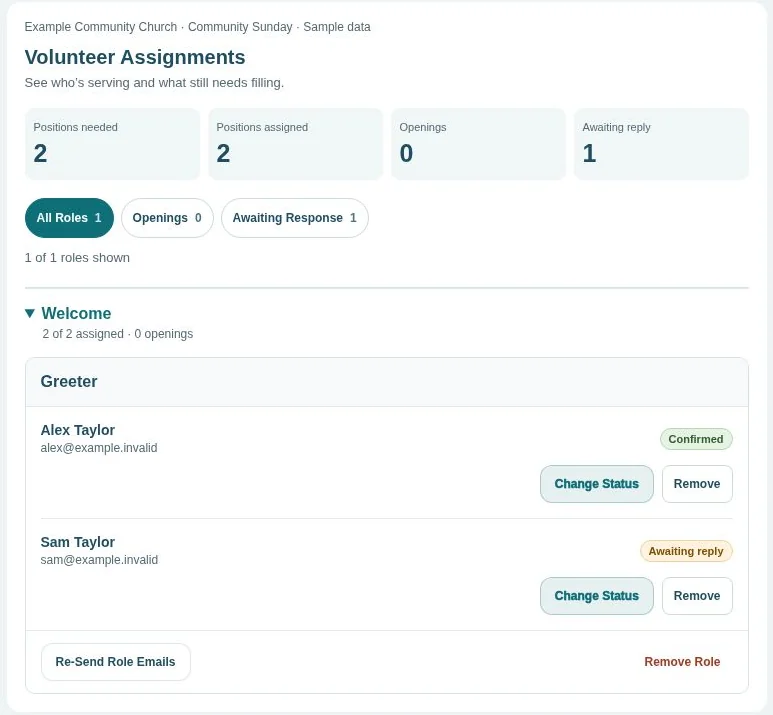
A look inside Sunday ServeSample church
Admin assignment dashboard showing confirmed volunteers and volunteers awaiting a reply.Enlarge (opens in a new tab)
See who’s serving, who’s replied, and where you still need help.

One organization. Two ways to fill an event.

Assign your team or share a sign-up sheet.

Use the approach that fits the occasion. Volunteers can use email links or an open shared link without an account.

You choose who serves

Assigned Events

For worship rotations, welcome teams, children’s ministry, and other roles where a leader builds the schedule.

  1. Add the roles and quantities your event needs, grouped by team.
  2. Choose eligible volunteers and send their assignment requests.
  3. Volunteers click YES or NO from their email.
  4. Review confirmations, find replacements, and send or schedule reminders.

Example: Schedule a greeter, a sound operator, and a children’s helper for Sunday morning, then see who has responded.

Volunteers choose where to help

The Sign Up Sheet

For church meals, outreach projects, VBS, and occasions where people choose from available positions.

  1. Select The Sign Up Sheet, then Invited households or Anyone with the link.
  2. Use saved team roles for invited households, or build custom roles across dates and services for an open sheet.
  3. Send private household invitations, or share an open link where people enter first and last names.
  4. Track filled positions and openings, print the sheet, and send manual reminders for invited household sign-ups.

Example: Invite families to a meal signup, or share one open sheet covering several Advent dates and services.

Explore The Sign Up Sheet

Simple for every generation

A familiar inbox. A clear next step.

Your volunteers don’t need another password to remember. Assignment and household emails link to requests and My Schedule. Open sheets can be reached directly through their shared link.

  1. Open the email

    See assigned roles or a household invitation in email. For open sheets, follow the link your organizer shares.

  2. Respond or sign up

    Click YES or NO for an assignment. Select household names on an invited sheet, or type names on an open sheet.

  3. View My Schedule

    My Schedule shows assigned and invited household commitments. Return to an open sheet through its shared link.

See how Sunday Serve would work for your church.

In a free live demo, we’ll walk through scheduling and sign-ups and answer your team’s questions.

Try the interactive demo on your own
Request a free demo

Built for the people you already serve with

From Sunday teams to special events.

Small churches

Keep teams, roles, and events in one place, with a flat monthly price as your volunteer list grows.

Simple church scheduling

Worship, welcome, and tech teams

Choose who serves in each position and track replies before Sunday. Print the event summary for a copy at church.

Worship team scheduling

Children’s ministry and VBS

Use saved teams and roles for assignments or household invitations. For custom sign-ups, build an open sheet with multiple dates, services, and roles.

Ministries within larger churches

Use email-based scheduling for a ministry whose volunteers prefer a simpler workflow. Sunday Serve operates separately from your other church software.

Scheduling without volunteer logins

A clear view for leaders

Build the event. Follow the replies.

Add multiple roles and adjust quantities together by team. For assigned events, choose which roles each person can fill and review their upcoming schedule and past six months of assignments. Track responses on the event page, send reminders, and print a summary when you need one.

Before you get started

Church volunteer scheduling questions.

Do volunteers need an app or a Sunday Serve account?

No. Sunday Serve is a web-based church volunteer scheduling app, but volunteers do not install an app or create an account. They use private email links for assignments, invited household sheets, and My Schedule. Open sheets use a shareable link and accept first and last names directly. Leaders sign in to manage the organization.

Can we assign volunteers and also let people sign up?

Yes. On Events, choose Admin Assigned Event to select who serves. Choose The Sign Up Sheet, then Invited households for private email invitations or Anyone with the link for a custom open sheet. You can use both event types in the same organization.

Can family members share an email address?

Yes. Household members can share an email address and still be scheduled individually. On invited household sheets, added names are remembered for future sign-ups in the same organization. Open sheets accept names without household profiles.

How do church volunteer reminders work?

For assigned events, leaders can send a reminder immediately or set automatic reminders before the event. Volunteers can respond or change their response and open their schedule from the reminder email. Invited household sheets have manual reminders. Open sheets use a shared link without email invitations or reminders.

Can we print the volunteer schedule?

Yes. Assigned events have a printable summary of roles and the volunteers filling them. The Sign Up Sheet has a paper-style print view with room for people to write in open positions.

Can a ministry use Sunday Serve alongside other church software?

Yes. A ministry can use Sunday Serve for volunteer scheduling while the church continues using other software for other work. This is a separate scheduling tool; it does not sync assignments or volunteer availability with other church systems. Leaders should check for overlapping commitments when using both.

How much does Sunday Serve cost?

Create an account and build schedules for free, with no credit card or trial required. Start a 30-day free trial when you’re ready to send volunteer emails. After the trial, it’s $10 per month per organization, with unlimited teams, roles, people, events, and admins.

A free resource for your next busy season

Planning Christmas volunteers?

Download a checklist, service coverage worksheet, and four friendly email templates. Use them with your current process. No signup required.

One plan for your organization

Set up your first service for free.

Add your teams and roles, then build a schedule. Start your 30-day free trial when you’re ready to email volunteers. After that, it’s $10 per month per organization.

See pricing details